Sample Email to Send a Resume for a Job (Plus 7 Templates)
A sample email to send a resume for a job has a subject line with the job title and your name, a 3-to-5-sentence body, a signature and an attached PDF resume (Firstname-Lastname-Resume.pdf). In Boomerang's 2016 study of all kinds of email, 50 to 125 words got the most replies.

Subject: Application | [Job Title] | [Your Name] Dear [Hiring Manager’s Name], I’m applying for the [Job Title] role at [Company], which I saw on [where you saw it]. In my role at [Current Company], I [one result with a number]. I want to join [Company] because [one specific reason]. I’ve attached my resume [and cover letter, if the posting asks for one]. Thank you for your time. Best regards, [Your Name] [Phone] | [Email] | [LinkedIn URL]
Find what you’re looking for:
- What to write in the email when sending a resume
- Subject lines by situation for mailing a resume
- How to send a resume and a cover letter email
- What format to use for your resume (PDF or Word)
- 7 resume email templates
- Frequently asked questions about emailing a resume
What Should I Write in an Email When Sending a Resume?
A body of around 3 to 5 sentences, in the same order as the steps below, is what to write in an email when sending a resume. Never paste your resume into the email itself; send it as an attachment instead.
What to say in an email with resume:
- Read the posting: Before you start writing, check the posting for a designated email address, subject format and preferred file types. Follow them exactly. Example: The job posting may say: “Email your resume as a PDF to jobs@[company].com with the subject [Job Title] - [Your Name].”
- Greeting: Use the hiring manager’s name if the posting, the company’s team page or LinkedIn gives it. If not, use “Dear Hiring Manager. ”Example: “Dear Ms. Lopez,”
- First sentence: Specify the job title and where you saw it, so the hiring manager can match your email to the correct job opening. Example: “I am applying for the [Job Title] role I saw on your careers page.”
- Specific result: Give a result or achievement relevant to the job description to show why you would be a good choice for the position. Example: “At my previous company, [Company Name], I [Activity] that resulted in [Number].”
- Why this company: Explain why you want to join this company in particular, such as a product you use, a recent launch or where the business is heading. Example: “I’d like to join [Company Name] because [Your Reason].”
- Closing: Mention the attachment, thank the reader for their time and sign off with your phone, email and LinkedIn. Example: “I’ve attached my resume. Thank you for your time. You can reach me at [Phone Number], [Email Address] or [LinkedIn]. All the best, [Name].”
How Do I Say I Am Sending My Resume?
“I’ve attached my resume for the [Job Title] role.” Nice and simple, unlike the stiff “Please find attached.” Similarly, “attached herewith” should be dropped immediately, if it somehow made it into your draft.
Instead, try one of these:
- Short: “My resume is attached.”
- With a cover letter: “I’ve attached my resume and the cover letter you asked for.”
- Replying to a recruiter: “Here’s the resume you asked for, as a PDF.”
What Subject Line Should You Use When Emailing a Resume?
“Application | [Job Title] | [Your Name]” is the formula to use unless the posting sets its own subject format. In that case, use their version word for word. Always put the job title or the name of the person who referred you for the job ahead of your name (if they agree).
This ensures that the recruiter can read your subject line at first glance, even if it gets cut off on mobile. The job title tells them what opening you’re referring to and your name makes finding your resume later easier. Leave out everything else, including a “Resume” or “Hello.”
Based on the situation, use one of the following subject line formats:
| Situation | Subject line |
|---|---|
| Posted job | Application | [Job Title] (Job ID [number], if listed) | [Your Name] Example: Application | Data Analyst (Job ID 4471) | Priya Shah |
| Referral | Referred by [Name] | [Job Title] | [Your Name] Example: Referred by Sam Ortiz | Product Designer | Priya Shah |
| Cold email, no posting | [Your Role] interested in [Team] roles | [Your Name] Example: Data Analyst interested in Analytics roles | Priya Shah |
| Internship or new graduate | [Internship Title] application | [Your Name], Class of [Year] Example: Marketing Intern application | Priya Shah, Class of 2026 |
How to Email a Resume and Cover Letter
Attach the cover letter if the posting asks for one, and keep the email short. If it doesn’t, the email does the cover letter’s job. Career sites disagree on attaching a cover letter as standard, so let the job posting decide.
When you do attach one, the email is “not a full cover letter, just a brief introduction,” as the NEIU career office guide puts it.
If you’re unsure how to email a resume and cover letter, use the table below:
| The posting says | What the email does | What to attach |
|---|---|---|
| Send a resume and cover letter | Short note pointing to both files | Firstname-Lastname-Resume.pdf and Firstname-Lastname-Cover-Letter.pdf |
| Send your resume | Does the letter’s job: job, result, why this company | The resume only |
| Cover letter optional | Short introduction | A letter for this job if you have one, else the resume |
| Nothing: you write cold | Why this company, and the team you want | The resume only |
Need help with the letter itself? AI Apply’s Cover Letter Generator can write your letter from the job description, so all you need to worry about is the email.
Should You Send Your Resume as a PDF or Word File?
PDF, unless the job posting specifically asks for a Word file (.doc or .docx). A PDF keeps your layout the same on any device, so the reader sees exactly what you sent. With AI Apply’s AI Resume Builder, you can tailor your resume to the job, then build your resume and export it as a PDF, or as a Word file if the posting asks for one.
Name the file Firstname-Lastname-Resume.pdf (or .docx), so it’s easy to find among the reader’s downloads. Attach it with the paperclip button or by drag and drop. Don’t send a link if you can avoid it, as the reader may have to request access to open it.
Be aware that sending resume via email comes with a size limit. As per Gmail Help, personal accounts can send up to 25 MB of attachments per email, and larger files are converted to Drive links. A resume PDF should sit well under that.
How to Email a Resume (Gmail Steps)
To send your resume from Gmail:
- Click Compose, then the paperclip icon, and attach your PDF.
- Write the subject line and the body.
- Send a test to your own address and open the attachment to check it.
- Add the recruiter’s address last, so a half-finished email can’t go out by mistake.
- Click Send.
7 Resume Email Templates for Every Situation
Pick the resume email that fits how you found the job, then fill in every [bracket]. Each email template for sending resume below ends with your name, so add your phone, email and LinkedIn underneath, as in the base email.
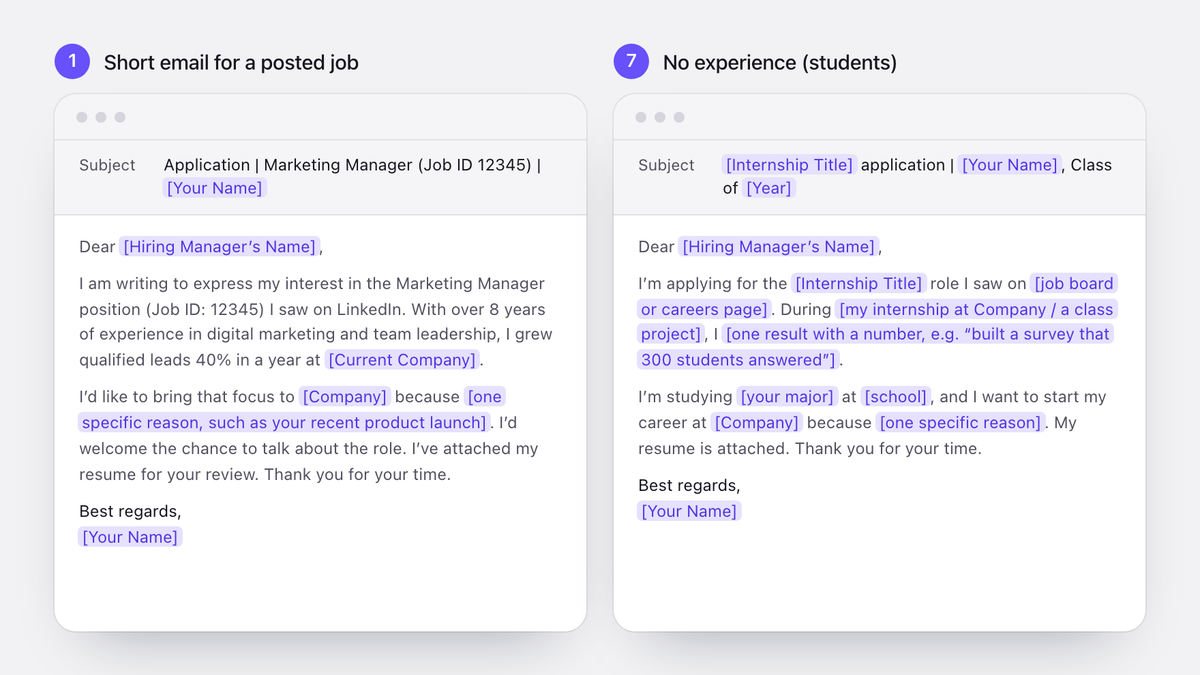
#1: Short Resume Email for a Posted Job
Use it when: You need a short email for sending resume files to a posted job.
Subject: Application | Marketing Manager (Job ID 12345) | [Your Name]
Body:
Dear [Hiring Manager’s Name], I am writing to express my interest in the Marketing Manager position (Job ID: 12345) I saw on LinkedIn. With over 8 years of experience in digital marketing and team leadership, I grew qualified leads 40% in a year at [Current Company]. I’d like to bring that focus to [Company] because [one specific reason, such as your recent product launch]. I’d welcome the chance to talk about the role. I’ve attached my resume for your review. Thank you for your time. Best regards, [Your Name]
Tip: Copy the Job ID exactly as the posting lists it.
#2: Referral Resume Email (With a Reference)
Use it when: Someone at the company has agreed to refer you.
Subject: Referred by [Name] | [Job Title] | [Your Name]
Body:
Dear [Hiring Manager’s Name], [Referrer’s Name] suggested I contact you about the [Job Title] role on your team. We worked together at [Company] for [number] years, where I [one result with a number]. [Referrer’s First Name] told me about [something specific about the team or project], and that’s the work I want to do next. I’ve attached my resume. Thank you for your time. Best regards,
Tip: Tell your referrer once you’ve sent it, so they can vouch for you if asked.
#3: Resume Email With Results (Experienced Candidates)
Use it when: You have 2 results that match the posting.
Subject: Application | [Job Title] | [Your Name]
Body:
Dear [Hiring Manager’s Name], I’m applying for the [Job Title] role I saw on [job board]. In [number] years as a [Your Job Title], 2 results stand out for this role: - [Result 1 with a number, e.g. “cut onboarding time from 6 weeks to 3”] - [Result 2 with a number, e.g. “managed a $2M annual budget”] I’d like to bring that to [Company] because [one specific reason]. My resume is attached. Thank you for your time. Best regards, [Your Name]
Tip: Pick the results closest to the posting’s top requirements, not your biggest numbers.
#4: Resume Email With a Portfolio (Creative Jobs)
Use it when: Your work matters as much as your resume, as in design, writing or video jobs.
Subject: Application | [Job Title] | [Your Name]
Body:
Dear [Hiring Manager’s Name], I’m applying for the [Job Title] role I saw on [job board]. Most recently, I [one result with a number, e.g. “redesigned a checkout page that raised completed orders 18%”]. You can see that project and 3 others here: [portfolio link]. Your work on [specific project or campaign] is why I want to join [Company]. My resume is attached. Thank you for your time. Best regards, [Your Name]
Tip: Open the link in a private browser window to check it loads without a login.
#5: Resume Email to HR or a Recruiter Who Asked for It
Use it when: A recruiter or HR contact has asked you to send your resume.
Subject: Re: [their subject line] (reply in their thread)
Body:
Hi [Recruiter’s Name], Thank you for reaching out about the [Job Title] role. Here’s the resume you asked for. In my current role at [Company], I [one result with a number], which fits what you described for this team. I’m free to talk [days or times that suit you], and I’m happy to send references or work samples if they would help. Thank you again. Best regards, [Your Name]
Tip: Hit "Reply" so your resume sits in the same thread as their request.
#6: Cold Resume Email When No Job Is Posted
Use it when: You want to work at a company that has no matching job posted.
Subject: [Your Role] interested in [Team] roles | [Your Name]
Body:
Dear [Team Lead’s Name], I’m a [Your Role] interested in joining the [Team] team at [Company]. In my current role, I [one result with a number]. I’m writing because [one specific reason, such as a product, a launch or the team’s work]. If you expect an opening on your team, I’d welcome the chance to talk. My resume is attached. Thank you for your time. Best regards, [Your Name]
Tip: Name the team in sentence one, so the email can be forwarded to the right person.
7. Resume Email With No Experience (Freshers and Students)
Use it when: You’re a student or new graduate working out what to write in email when sending resume with no experience.
Subject: [Internship Title] application | [Your Name], Class of [Year]
Body:
Dear [Hiring Manager’s Name], I’m applying for the [Internship Title] role I saw on [job board or careers page]. During [my internship at Company / a class project], I [one result with a number, e.g. “built a survey that 300 students answered”]. I’m studying [your major] at [school], and I want to start my career at [Company] because [one specific reason]. My resume is attached. Thank you for your time. Best regards, [Your Name]
Tip: A class project, volunteer role or part-time job counts if it has a result.
FAQ: Emailing Your Resume
How to write an email for a job application with a resume?
Write 3 to 5 sentences: the job and where you saw it, one result with a number, why you want this company and a line saying your resume is attached. Add a clear subject line and a signature.
What is an example of a good email for a job application?
A good example is the base email, filled in for one named job:
Subject: Application | Data Analyst | Priya Shah Dear Ms. Lopez, I’m applying for the Data Analyst role I saw on Northwind’s careers page. At Brightline, I built a weekly sales dashboard that 40 account managers use. Northwind’s move into same-day delivery is the kind of problem I want to work on. I’ve attached my resume. Thank you for your time. Priya Shah (555) 010-2231 | [email protected]
Do emailed resumes go through an applicant tracking system?
You can’t tell. An emailed resume may be read in the inbox or added to an applicant tracking system, so format it for software and people alike. Our ATS resume formatting rules cover the details.
When should you follow up after emailing your resume?
Follow up once, about 2 weeks after sending, to the same person, replying in your original thread. See how long to hear back for what the wait means and our follow-up email samples for wording.