How to Automate LinkedIn Easy Apply With AI (Without Losing Your Account)
Automate LinkedIn Easy Apply with AI the safe way: automate matching, tailoring, answers and follow-up, and keep the submission click yours.


Job searching in 2026 means competing with hundreds of applicants for a single posting while both sides of the process quietly hand the work to AI. This guide separates the automation that helps from the automation that gets your account restricted.
You can automate almost every part of LinkedIn Easy Apply with AI except the click itself. LinkedIn's User Agreement prohibits third-party bots, scripts, and browser extensions that automate activity on its site, so the workflow that actually holds up uses AI for role matching, resume tailoring, screening-question answers, ATS checks, and follow-up, then leaves the submission to you. Built that way, one Easy Apply application takes two to four minutes instead of fifteen, and your account survives the search.
That distinction sounds like a technicality. It is not. Most guides on this topic hand you a GitHub repo or a Chrome extension that fires off a hundred applications overnight. Those tools work, mechanically. They also stake your LinkedIn account, which is usually your entire recruiter-facing professional record, on applications that convert at rates most builders quietly stop publishing. And the thing they optimize for, raw throughput, is precisely what hiring pipelines in 2026 are built to screen out.
So the reason to automate Easy Apply is not to send more applications. It is to make each one cheap enough that you can afford to be selective.
Two Very Different Things Get Called "Easy Apply Automation"
One is assisted applying: AI prepares the application and you press the button. The other is bot applying: software presses the button for you. They produce similar-looking output and completely different outcomes, which is why so much advice on this topic is confusing.
Assisted applying treats Easy Apply as the fast lane it was designed to be. Your resume is already tailored to the posting, your answers to the recurring screening questions are already written, and the actual submission takes six seconds inside LinkedIn's own interface. Bot applying treats Easy Apply as a form to be brute-forced, which requires software that logs in as you, reads the page, and clicks on your behalf.
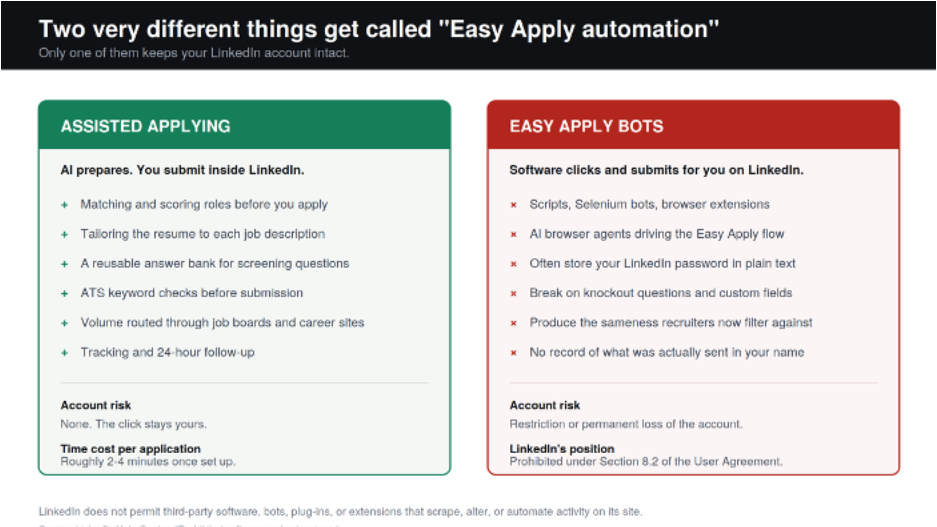
AIApply builds for the first model. The broader case for automating job applications with AI rests on removing repetition from the process, not on removing your judgment from it. Everything below assumes you want the speed without the account risk.
Why Easy Apply Bots Put Your LinkedIn Account at Risk
LinkedIn's position is not ambiguous. Its help center on prohibited software and extensions states that the platform does not permit third-party software, including crawlers, bots, browser plug-ins, or extensions that scrape, modify the appearance of, or automate activity on the site. The same page ties this to the "Don'ts" in Section 8.2 of the User Agreement, which separately bars using bots or other automated methods to access the service. Every Easy Apply bot on GitHub, and every extension that clicks through the flow for you, sits inside that description.
The enforcement consequence is the part people underrate. LinkedIn can restrict or permanently close an account it believes is running automation, and the restriction lands on the account, not the tool vendor. If your profile is where recruiters find you, where your recommendations live, and where your professional history is documented, that is a genuinely bad trade for a few hundred low-conviction submissions.
There is a second, quieter risk. Most open-source Easy Apply bots ask you to put your LinkedIn email and password into a plain-text configuration file on your own machine so the script can log in as you. Anyone who has ever accidentally committed a config file to a public repository understands why that is a problem.
The people who built these bots have mostly stopped recommending them
One of the more widely forked AI-powered Easy Apply bots now opens its own README with a warning from its developer: "I no longer recommend using this bot." His reasoning is the useful part. He reports that before he fixed his resume, fewer than 1% of the bot's applications turned into interviews, and that what finally moved his results was an ATS-readable resume tailored to each role. He now points people at resume optimization instead, and notes it carries no risk of a LinkedIn ban.
That is the whole argument in miniature, from someone with no incentive to make it. Volume was never the constraint. Relevance was.
AI Browser Agents Are the Same Rule in a Friendlier Wrapper
Prompt libraries have started circulating for pointing an AI browser agent at LinkedIn Jobs: filter to Easy Apply listings, read each description, fill the fields from your profile, write two or three sentences on why you are interested, cap the session at twenty applications, and wait thirty to sixty seconds between each one. The prompts are well designed, and the pacing and review steps genuinely reduce the odds of both detection and embarrassing submissions.
They do not change the rule. An AI browser agent driving the Easy Apply flow is third-party software automating activity on LinkedIn, which is the exact behavior Section 8.2 describes. Rate limiting is a mitigation, not permission. Treat any tool that promises hands-off applying on LinkedIn as carrying account risk, however sophisticated the underlying model is.
The same prompt structure is genuinely useful somewhere else, though. Point it at your own drafts instead of at LinkedIn: have it read a job description, draft your answers to the screening questions, and flag which of your resume bullets fail to address a stated requirement. You get the output without handing over the click.
Why Bot-Speed Volume Stopped Working in 2026
The market has already absorbed the automation wave, and it responded by devaluing volume. Greenhouse chief executive Daniel Chait told Fortune in July 2026 that roughly 254 people now apply to the average job posted on his platform, and that applications per recruiter have risen 412% since 2022. He calls the result an AI doom loop: candidates buy cheap tools to blast applications everywhere, recruiters deploy AI to survive the flood, nobody can tell serious interest from an overnight auto-apply run, and both sides get worse outcomes.
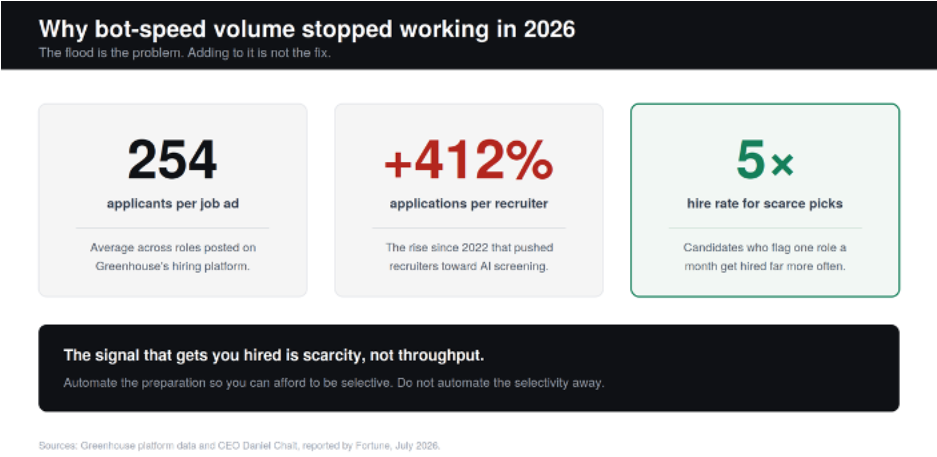
The countermeasure Greenhouse shipped is the tell. It added a feature that lets a candidate flag exactly one role per month as a genuine priority, on the theory that scarcity forces real intent and real intent is a signal an employer can trust. Chait says candidates who use it get hired at roughly five times the rate of everyone else. The platforms are actively engineering rewards for restraint.
LinkedIn is doing the same thing from the other direction. Its January 2026 talent research found that US applicants per open role have doubled since spring 2022, that 66% of recruiters say finding qualified talent got harder over the past year, and that 81% of people have used or plan to use AI in their job search. In the same release, LinkedIn reported that its job match feature cut the rate at which US Premium subscribers apply to low-match roles by 10%. The platform is nudging people to apply less and apply better.
None of this means volume is worthless. It means volume only pays when it sits on top of targeting. If you want the numbers behind that trade-off, our breakdown of how many jobs to apply to per week covers what a realistic weekly pipeline looks like and when a low response rate is a targeting problem rather than a volume problem.
The Five Layers of Easy Apply You Can Automate Safely
Strip the click out of the equation and almost everything else on the list is fair game. These five layers are where the fifteen minutes per application actually goes, and each of them can be handed to AI without touching LinkedIn's automation rules.
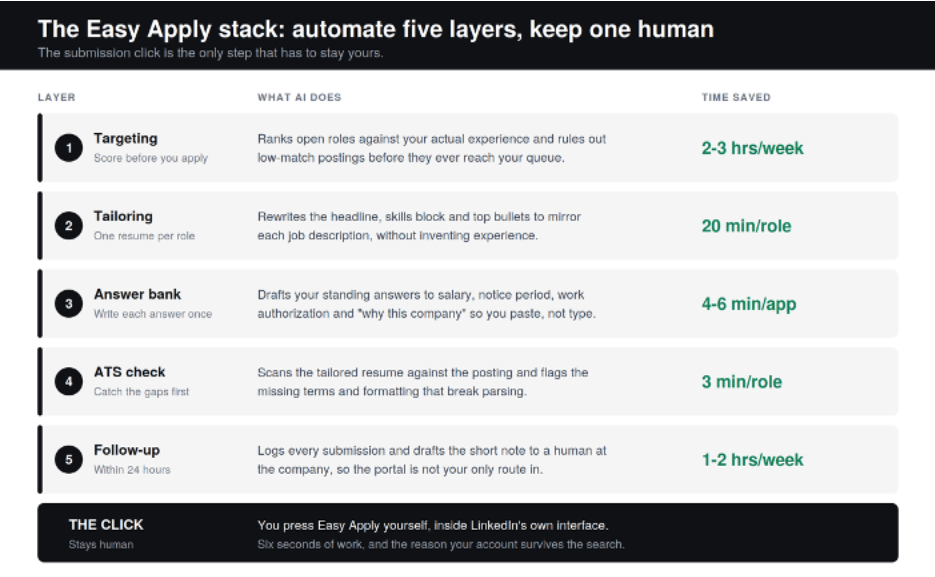
- Targeting. Score roles against your real experience before any of them reach your apply queue. This is the layer most people skip, and it is the one that determines whether the other four are worth doing. AIApply's job board ranks openings by match so the low-fit postings never cost you a decision.
- Tailoring. Rewrite the headline, skills block, and top bullets to mirror each posting. Jobscan's analysis of nearly a million applications found that matching the exact job title made candidates 3.5 times more likely to land an interview, and that including a cover letter made them 1.9 times more likely. AIApply's AI Resume Builder does this pass in under two minutes per role, and every line stays editable so the specifics only you would know still make it in.
- The answer bank. Easy Apply asks the same eight questions forever: notice period, salary expectation, years of experience, work authorization, willingness to relocate, and some variation of why this company. Write each answer once, with AI drafting the first pass, then paste. This single habit removes most of the friction that makes people reach for a bot.
- The ATS check. Run the tailored version against the posting before you submit it, not after you get rejected. AIApply's Resume Scanner flags the missing terms and the formatting that breaks parsing, which is the failure mode most people never find out about.
- Follow-up. Log what you sent and draft a short note to an actual person at the company within a day. Portals are crowded; a message is a second route in. Automating the drafting here is what makes it realistic to do it every time instead of occasionally.
Notice what is missing from that list. The submission. Six seconds of work, and the reason your account is still there in three months. If you want a wider view of which tools cover which layers, our roundup of free AI tools for job seekers maps the category honestly, including where the free tiers run out.
How to Build the Workflow in About an Hour
This is a one-time setup. After it, your marginal cost per Easy Apply application is a couple of minutes.
- Fix the base resume first. Everything downstream copies from it. One page or two, clean structure, no columns or text boxes, real metrics in the top three bullets of your most recent role.
- Write the answer bank. Open a single document. Draft your standing answers to the eight recurring screening questions, plus a two-sentence and a four-sentence version of your pitch. Keep it open while you apply.
- Set your targeting rules. Titles you want, titles you never want, locations, salary floor, company sizes to skip. Automation is only as good as these rules, and vague rules are how people end up applying to roles in the wrong country.
- Build a scoring habit. Before you apply, rate the role from 0 to 10 on how well you match the stated requirements. This takes fifteen seconds and drives the tiering decision in the next section.
- Tailor, scan, submit. Generate the role-specific resume, run the ATS check, then press Easy Apply yourself. Do not batch this into a marathon session; two focused blocks a day beats four unfocused hours.
- Log it and follow up. Record company, role, date, resume version, and a follow-up date. Send the note within 24 hours while the posting is still fresh in the recruiter's queue.
- Prepare for the callback. The point of saving those hours is to spend them somewhere that converts. AIApply's mock interview and Interview Buddy are built for that half of the funnel, used responsibly as preparation and live support rather than as a script to read from.
For the strategic version of this sequence, including how tailoring, timing, and follow-up compound, see our guide to the best way to apply for jobs.
When to Easy Apply, When to Apply Direct, and When to Let Automation Run
The mistake is treating every role the same way. Score the job first, then pick the channel. This is the tiering AIApply recommends, and it is what stops a high-volume search from turning into a spray.
| Fit score | What the role looks like | How to apply | Weekly target |
|---|---|---|---|
| 9 to 10 | A named target company, or a role you match on almost every requirement | By hand, on the company career site, with a note to a human the same day | 2 to 4 |
| 7 to 8 | A solid match worth a tailored application, but not worth an hour of research | LinkedIn Easy Apply, with an AI-tailored resume and your answer bank | 10 to 15 |
| Below 7 | Plausible on paper, but you are guessing about the fit | Let automation extend your reach on job boards and career sites, not on LinkedIn | Whatever your credits allow |
That bottom tier is where a genuine auto-apply tool earns its place. To be explicit about how AIApply's Auto-Apply works: it is not a LinkedIn Easy Apply bot. It runs on credits, matches roles from AIApply's own job board, tailors the resume and cover letter to each one, and submits through job boards and company career sites. Your LinkedIn account is not driving any of it, which is exactly why it does not carry the account risk described earlier. AIApply takes the same position on Indeed, where our guide to applying on Indeed is explicit that the platform prohibits third-party auto-apply bots and that you should submit through Indeed's own flow.
The scoring framework behind the table, along with the case for applying by hand to anything at a named target company, is laid out in more depth in how to get hired fast.
How to Tell Whether Your Automation Is Actually Working
Speed is not the metric. Callbacks are. Track four things and you will know within about thirty applications whether the system is working or whether you have just built a faster way to be ignored.
- Callback rate by channel. Track Easy Apply, direct career-site applications, and referrals separately. If one channel is producing all your responses, move your effort there rather than raising volume everywhere.
- Callback rate overall. A few percent on cold applications is normal and not a crisis. Consistently near zero after thirty submissions points at targeting or the resume, and adding volume will not fix either.
- Minutes per application. If a tailored Easy Apply submission still takes you twelve minutes, one of the five layers is not actually automated yet. Find which one.
- Share of applications with a follow-up. This is usually the number that is quietly zero. It is also the cheapest one to fix.
One more input worth auditing while you are here: the profile recruiters land on after they read your application. A weak headline undoes a strong application, and our LinkedIn headline examples cover what actually gets clicked.
The Version of This That Actually Works
Automating LinkedIn Easy Apply is worth doing. Automating the click is not. Once you separate those two things, the decision gets simple: hand the matching, tailoring, answers, ATS checks, and follow-up to AI, keep the submission and the judgment, and route your genuine high-volume reach through channels that do not stake your professional profile on it.
AIApply is built for exactly that split. Over two million job seekers use the platform, and 61% of them report an interview within their first ten days. Start by running your current resume through the Resume Scanner against one posting you actually want. It takes about three minutes, and it will tell you whether your problem was ever really speed.
Frequently Asked Questions
Is it against LinkedIn's rules to use an Easy Apply bot?
Yes. LinkedIn's User Agreement prohibits using software, scripts, bots, browser plug-ins, or extensions to automate activity on the platform, and its help center names this behavior specifically. Using an Easy Apply bot puts your account at risk of restriction or permanent closure, regardless of how carefully the tool paces itself.
Can LinkedIn tell if you use automation?
LinkedIn does not publish its detection signals or thresholds, but automation typically leaves patterns that a normal browsing session does not, such as extremely consistent timing or unusually high volumes of identical actions. The practical takeaway is that you cannot verify you are safe, and the downside is your account.
Does LinkedIn Easy Apply hurt your chances compared to applying on the company website?
Easy Apply does not hurt you, but it does put you in a larger pile, because a lower-friction application attracts more applicants. Use Easy Apply for solid matches worth a tailored application, and apply directly on the company career site for roles you genuinely want, where the extra effort is a signal in itself.
Can AI answer LinkedIn's screening questions for me?
AI can draft your answers, and you should let it, but the answers still have to be true and you should review them before they go out. Build a reusable answer bank for the recurring questions on notice period, salary, experience, and work authorization, then paste from it. Never let a tool generate an answer about your experience, authorization, or credentials that you have not verified.
How many Easy Apply applications should I send per day?
Most active job seekers should target 10 to 15 tailored applications a week, or 20 to 30 if they are searching full time and unemployed. The ceiling is not a number of clicks; it is how many applications you can tailor, track, and follow up on without the quality collapsing.
Is AIApply's Auto-Apply a LinkedIn Easy Apply bot?
No. AIApply's Auto-Apply matches roles from AIApply's own job board, tailors your resume and cover letter to each posting, and submits through job boards and company career sites rather than driving your LinkedIn session. It runs on credits, and you can review what it is sending. That design is deliberate: it extends your reach without putting your LinkedIn account inside an automation loop. Full details are on the Auto-Apply page.
Will recruiters know my application was written with AI?
Recruiters increasingly assume some AI involvement, and most of them are using AI on their side too, so the concern is not detection but sameness. What gets noticed is specificity: real metrics, the actual language of the posting, and details about the company that a generated draft would not contain. Use AI for the first pass and add the specifics yourself.
What should I do if my LinkedIn account gets restricted?
Stop using every third-party tool connected to LinkedIn immediately, do not create a second account, and follow LinkedIn's own appeal process from the notice you received. Creating a replacement account or continuing to test extensions generally makes the outcome worse rather than better.