How To Find Salary On Glassdoor? Complete Guide (2026)
Master Glassdoor salary research with this complete guide. Get accurate pay data, understand what ranges really mean, and negotiate with confidence.


You've made it to the final interview round. The energy is great, the role sounds perfect, and then they drop the salary number.
It's $20,000 below what you expected, according to research from the U.S. Bureau of Labor Statistics.
This happens more than you think. And it's completely avoidable if you do your salary research before you invest weeks in an application process.
Glassdoor can show you what a role actually pays (in under 2 minutes) based on real data from people doing that exact job, in your location, sometimes even at the specific company you're targeting. You can see base pay, bonuses, commissions, and where most offers actually land.
This guide shows you exactly how to find salary information on Glassdoor, how to interpret what you're seeing, and how to turn that data into leverage during your job search.
Why People Search Glassdoor Salaries
When someone searches this, they're usually trying to do one (or more) of these things:
Check the market rate for a job title in a specific city or country (like "Marketing Manager in London")
Verify what a specific company pays for a role (like "Marketing Manager at Company X")
Understand the full compensation picture (base salary versus bonuses, commissions, and other "additional pay")
Decide if a role is worth applying to (or whether to aim higher and keep searching)
Prepare for salary expectations or negotiation with real, data-backed numbers, as recommended by official U.S. Department of Labor career resources
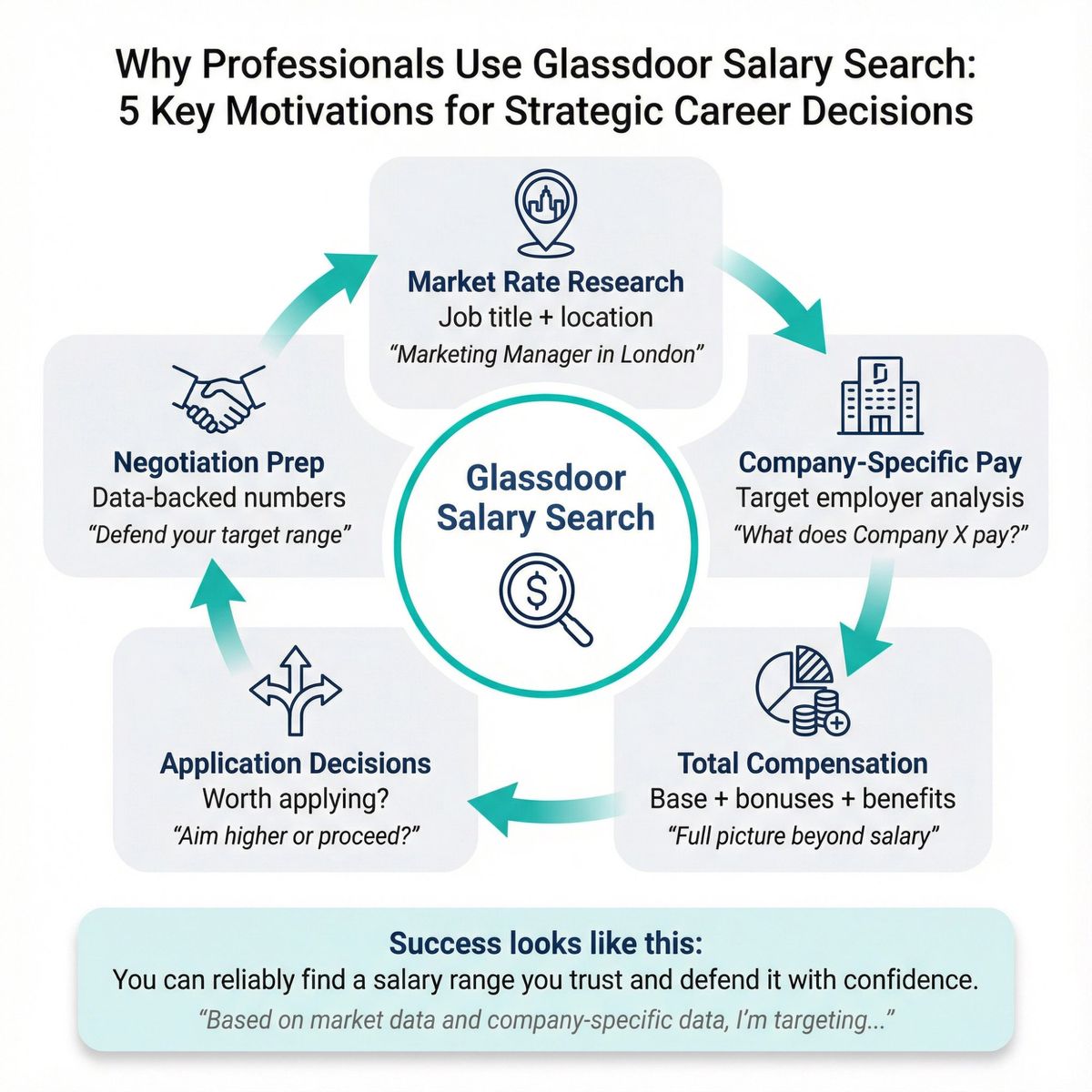
Success looks like this: You can reliably find a salary range you trust, and you can defend it in a conversation without guessing. ("Based on market data and company-specific data, I'm targeting...")
How To Find Glassdoor Salary (3 Quick Methods)
If you just want the salary number right now, pick the method that fits your situation:
Option A: Salary by role + location (market rate)
① Go to Glassdoor (external salary research platform)
② Click Salaries
③ Search job title + location
④ Review the Total pay range, Median, and Pay breakdown, based on aggregated salary data from millions of workers
Use this when you want to know: "What does this role typically pay around here?"
Option B: Salary by company + job title
① Search the company name on Glassdoor
② Open the company profile
③ Go to Pay & benefits (or Salaries)
④ Pick a job title and location to view salary details
Use this when you want to know: "What does Company X pay for this specific role?"
Option C: Personalized estimate (Know Your Worth)
Use Glassdoor's Know Your Worth calculator to generate a private estimate based on your exact title, company, location, and experience.
Use this when you want to know: "Am I being paid fairly, and what could I earn right now?"
What Is Glassdoor's "Give-to-Get" Policy?
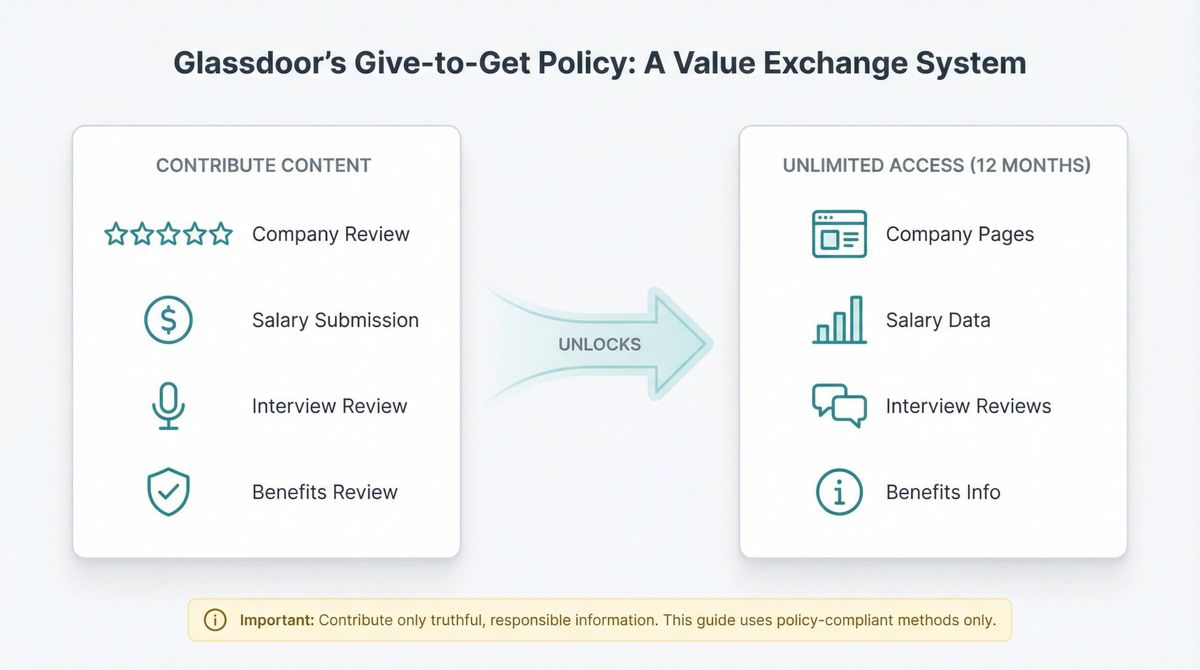
Glassdoor uses a "Give-to-Get" model.
Here's what that means: to get unlimited access to certain company pages, salary data, interview reviews, and benefits info, you might need to contribute content first (like a company review, salary submission, interview review, or benefits review).
According to Glassdoor's official documentation, contributing unlocks 12 months of access after your content is posted.
Important: This guide sticks to legit, policy-compliant methods. Don't use shady workarounds that break terms or violate privacy expectations.
You can often view some salary info without contributing, but if you hit a wall asking for a review, now you know why.
How To Find Salary By Job Title and Location
This is the best path when you want to answer: "What does this role typically pay around here?"
1) Go to the Salaries section
On Glassdoor's homepage, use the top navigation and select Salaries.
2) Search your job title + location
Enter your job title (use the closest standard title you see in actual job ads) and your location (city, region, or country where the job is based).
Glassdoor will show you a salary page for that title and location, powered by real-time labor market data. You can benchmark against various salary levels across different industries.
3) Use the filters that actually matter
On a role salary page, you'll typically see filters like:
| Filter | Why it matters |
|---|---|
| Experience | "Software Engineer" with 2 years of experience pays very differently than 10 years, according to BLS occupational data |
| Industries | Tech companies pay differently than non-profits for the same role title |
These filters are critical because the same job title can mean wildly different pay depending on industry and experience level.
4) Read the salary section correctly
A typical Glassdoor role salary page includes:
• Total pay range (the full spectrum from low to high)
• Median total pay (the middle number, where half earn more and half earn less)
• Pay breakdown (Base pay + Additional pay, separated out)
• About our data (often includes a confidence label)
• Last updated date and number of salaries submitted
Real example: Software Engineer in the United States
According to industry salary data, here's what you'd typically see:
| Metric | Value |
|---|---|
| Total pay range | $118K–$188K/yr |
| Median total pay | $148K/yr |
| Base pay range | $92K–$140K/yr |
| Additional pay range | $26K–$48K/yr |
| "Most Likely Range" | 25th to 75th percentile |
| Last updated | Apr 10, 2025 |
| Salaries submitted | 707.3K |
You don't need to memorize these numbers. Use them as a template for what to look for on your own search: range + median + breakdown + sample size + last updated.
The key insight? That "Most Likely Range" isn't the absolute minimum and maximum anyone has ever earned. It's where most actual offers fall (the middle 50%).
How To Find Salary By Company Name
This is the best path when you want to answer: "What does Company X pay for this role?"
1) Find the company page
Search for the company on Glassdoor and open its profile, as recommended by professional career development resources. This is valuable preparation when researching employers.
2) Go to Pay & benefits (or Salaries)
Company profiles typically include a Pay & benefits section where all the salary data lives.
3) Use "Search by job title and location"
On a company's salary hub, you'll often see:
• "Explore [Company] salaries"
• A search bar for job title + location
• A list of job titles with pay ranges and how many salaries were submitted
4) Click a job title to see the deeper breakdown
When you click into a specific job title at a company, the salary detail page typically shows:
→ Total salary range for that role at that company
→ Pay breakdown (base versus bonus/additional)
→ Confidence label (how reliable Glassdoor thinks this estimate is)
→ Last updated date
→ Number of salaries submitted
→ Sometimes a distribution-style "How accurate is this range?" widget
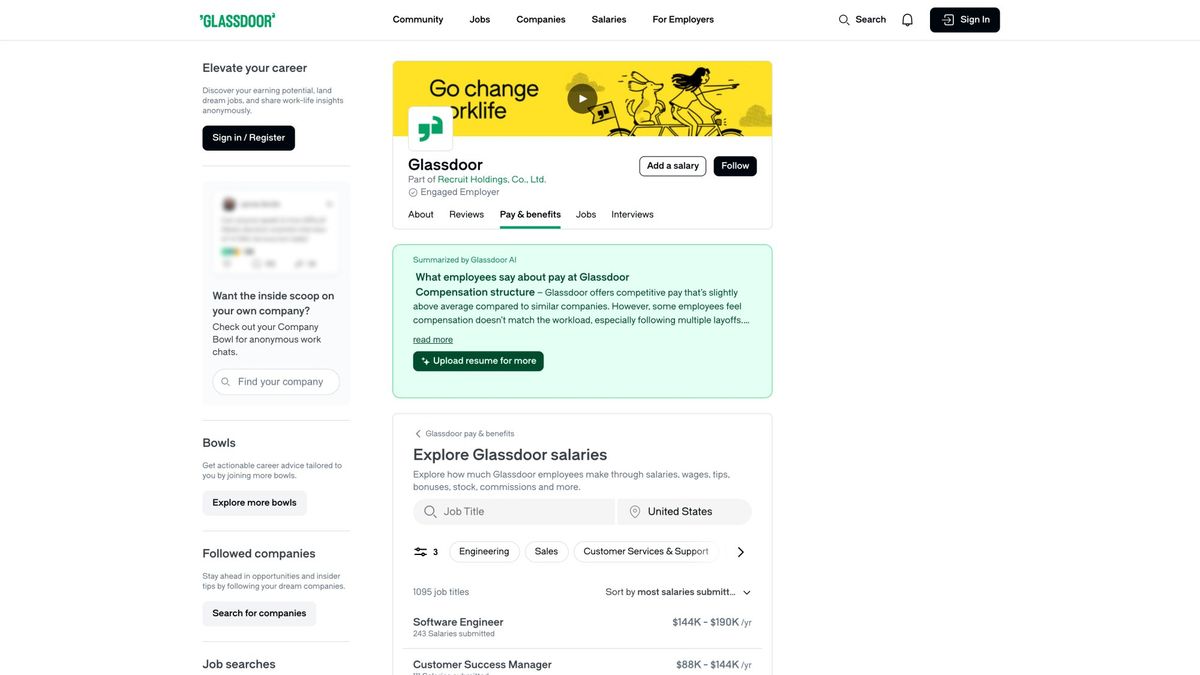
What this looks like: Glassdoor's own company data
On company salary pages, you'll see a total salary range, median total pay, base versus bonus breakdown, and a "Last updated" date along with the number of submitted salaries.
This company-specific data is gold when you're preparing for interviews or negotiating a job offer, because it's not just market average. It's what that exact company tends to pay.
How To Use Glassdoor's "Know Your Worth" Calculator
If your goal is: "Am I being paid fairly, and what could I earn right now?" then Glassdoor's Know Your Worth tool is designed exactly for that.
How to use it
① Go to Glassdoor's Know Your Worth salary calculator
② Enter your:
• Title
• Company (or target company)
• Location
• Experience (and any other prompted details like education or skills)
③ Get a personalized estimate
Glassdoor describes the tool as personalized based on your title, company, location, and experience. It's private (only visible to you) and built from millions of salaries and current job openings.
When this is most useful
Negotiating a raise in your current role (you can show data on what you should be earning, backed by market wage data)
Deciding whether to switch companies (see if a new offer is actually better or just different)
Getting a quick market value baseline before interviews (so you don't accidentally lowball yourself)
How To Read Glassdoor Salary Data Correctly
Most people make one of two mistakes when reading Glassdoor data: They anchor on the median without checking the range, or they anchor on the top end of the range without understanding what it actually represents.
Here's the correct way to read this stuff.
1) Understand "Most Likely Range"
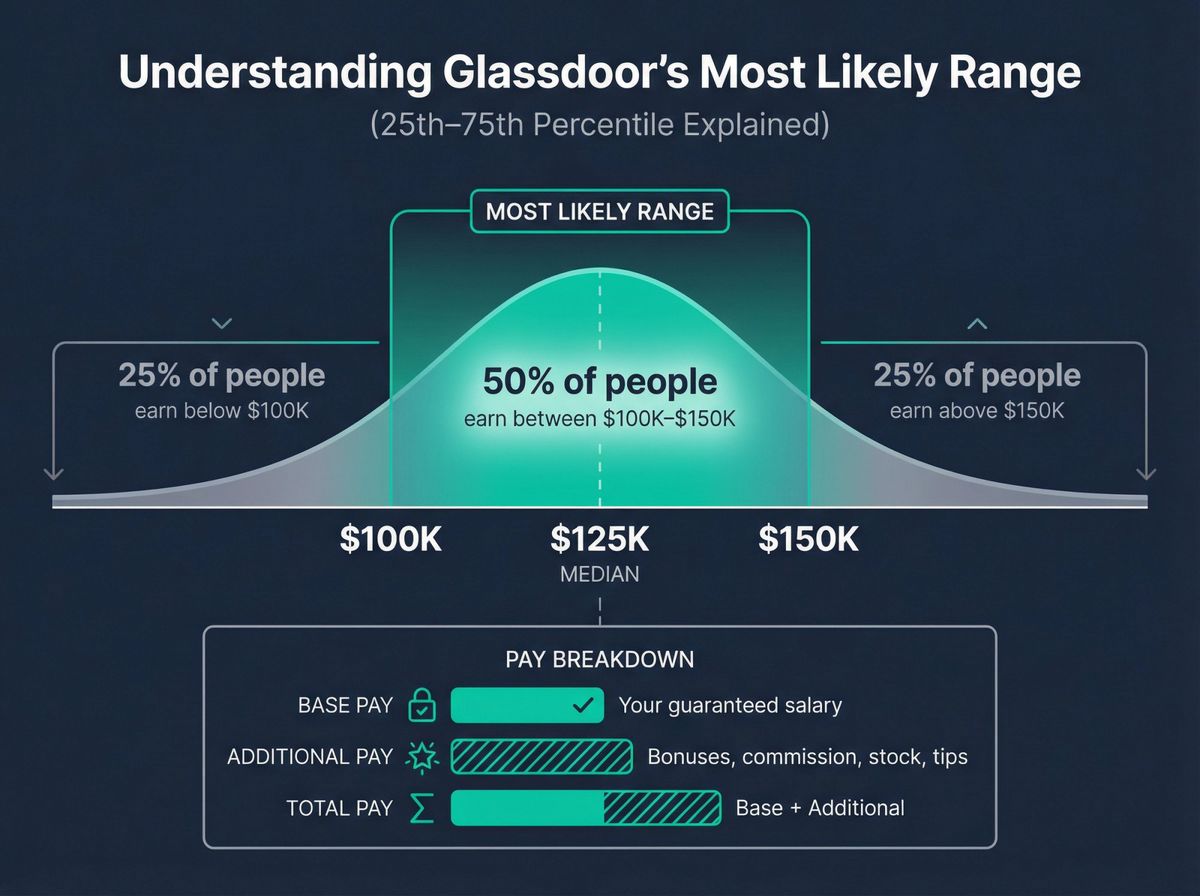
On role salary pages, Glassdoor explicitly notes that the "Most Likely Range" reflects values within the 25th and 75th percentile of available pay data for that role.
That means:
• It's not the absolute minimum versus maximum anyone has ever been paid
• It's closer to "where most real offers fall" (the middle 50% of the distribution)
So if you see a range of $100K–$150K as the "Most Likely Range," that means:
→ 25% of people in that role earn below $100K, according to labor statistics methodology
→ 50% of people earn somewhere between $100K and $150K
→ 25% of people earn above $150K
This is important because if you aim for the top of that range without strong justification (like years of experience or specialized skills), you might price yourself out of opportunities.
2) Total pay vs base pay vs additional pay
Glassdoor often breaks pay into three components:
| Component | What it includes |
|---|---|
| Base pay | Your salary or hourly rate (the guaranteed part) |
| Additional pay | Bonuses, commission, profit sharing, tips, stock options, etc. |
| Total pay | Base + Additional combined |
Why this matters for negotiation:
Some roles look "high paying" because the additional pay is large and variable (like a sales role with big commission potential), according to compensation survey data. Others are mostly stable base pay (like many salaried corporate roles).
If you're risk-averse, you want a role where base pay is high. If you're comfortable with variable comp, you might chase a role where additional pay is substantial.
You can see this breakdown on role pages across various salary research platforms, according to compensation data from the U.S. Bureau of Labor Statistics.
3) Check "Last updated" and sample size
Two quick rules to follow:
Prefer pages with recent updates. A salary page last updated in 2022 might not reflect current market conditions (especially post-pandemic shifts).
Prefer pages with many salaries submitted. A page with 5 salaries is directional at best. A page with 50,000 salaries is much more reliable.
Glassdoor displays both the last updated date and salary submission count on role pages, so you can judge data quality at a glance.
4) Treat low-sample company data carefully
Company-specific salary pages can be extremely useful, but if a title shows only a few submissions (like 3–5), use it as a directional signal, not gospel.
Glassdoor itself acknowledges accuracy concerns and displays confidence/accuracy cues on salary pages to help you assess reliability.
7 Ways To Get More Accurate Glassdoor Salary Data
If you want the real value from this guide, it's in this section.
These tactics take an extra 10 minutes but can literally save you from leaving $10,000+ on the table during salary negotiations, as documented in wage negotiation research.
1) Search 3 titles, not 1
Job titles are messy and inconsistent across companies.
Here's what to do:
→ Search the exact title in the job ad
→ Search the closest standard equivalent (e.g., if the ad says "Customer Success Specialist," also try "Customer Success Manager")
→ Search the level above and below (e.g., "Senior Customer Success Manager" and "Junior Customer Success Manager")
Then compare ranges and medians across all three searches.
Glassdoor also surfaces related job titles on role pages, which makes this faster.
Why this works: Companies use different titles for the same work. By checking multiple variations, you get a more complete picture of what the market actually pays for what you'll be doing, regardless of what they call it.
2) Always lock the location (don't wing it)
A remote job posting might still pay based on:
• Your physical location (common for US companies hiring across states)
• The employer's headquarters (some companies pay everyone on the HQ scale)
• A regional band (like "West Coast" versus "Midwest")
Make sure your Glassdoor search location matches the likely pay band for the role you're researching.
If you're unsure, search both your location and the company's HQ location, then ask the recruiter which they use during the interview process.
3) Use the pay breakdown to spot "commission traps"
If a role shows big additional pay relative to base pay, verify:
| Question | Why it matters |
|---|---|
| What percent of total compensation is variable? | You need to know your guaranteed income |
| Is that typical for your industry and role type? | Sales roles vary; corporate roles shouldn't |
| What happens if you don't hit targets? | Can you survive on base alone? |
Role pages provide base versus additional pay ranges, so you can see the split at a glance.
Why this matters: A job advertised as "$120K total comp" might be $60K base + $60K potential commission, according to compensation structure research. If you don't hit sales targets, you're living on $60K, not $120K.
4) Use "Top paying companies" to calibrate what's possible
Many role pages list top paying companies for that role in that location.
This is useful to:
• Identify who's paying above market (and potentially target them)
• Avoid anchoring too low when you see what top-tier companies offer
• Decide where to apply next if compensation is your priority
You can find this on pages across various salary platforms.
5) Use "Top paying industries" to sanity-check your sector
A "Data Analyst" role in finance may have a very different comp structure (and total pay) than a Data Analyst in education or non-profit, according to industry wage surveys.
Glassdoor surfaces top paying industries for some roles, which helps you understand if you're in a high-paying sector or if you might earn more by switching industries (even with the same job title).
6) Don't blindly trust employer-posted ranges
In a Glassdoor analysis on pay range accuracy (published September 30, 2024), Glassdoor found that employer-provided pay ranges were accurate about 67% of the time.
Here's the breakdown:
| Accuracy Metric | Percentage |
|---|---|
| Salaries within posted range | 67% |
| Salaries below posted range | 22% |
| Salaries above posted range | 11% |
(These numbers come from comparing employer-posted ranges against user-reported salaries for the same job, employer, and city.)
What to do with that:
Treat posted ranges as useful but not final. Validate with role + company salary data from Glassdoor and ideally at least one more independent source.
If an employer posts "$80K–$100K" but Glassdoor user data shows most people at that company in that role earn $70K–$85K, you know the posted range might be optimistic.
7) Make a 3-number negotiation plan (instead of one "expected salary")
Instead of walking into a negotiation with a single number, build three:
| Number | What it represents |
|---|---|
| Target number | What you want (based on market + your experience) |
| Strong range | Where you'd happily accept (your realistic band) |
| Walk-away floor | Where it's not worth it (your minimum to stay interested) |
Glassdoor data gives you the range. Your job is to map it to your situation.
Example:
If Glassdoor shows $100K–$150K for your role and location, you might build, based on negotiation best practices:
• Target: $145K (high end, justified by your 8 years of experience)
• Strong range: $130K–$150K (you'd be happy anywhere in here)
• Walk-away floor: $120K (below this, it's not worth leaving your current job)
Now when they ask "What are your salary expectations?" you can say: "Based on market data for this role and my experience, I'm targeting $130K–$150K," according to salary negotiation research from the U.S. Department of Labor.
You sound confident, data-backed, and reasonable (not greedy, not desperate).
What To Do When Glassdoor Asks For A Contribution
If you hit a wall that says you need to contribute content to unlock access, here's the clean approach.
What's happening
Glassdoor's Give-to-Get policy encourages users to contribute content (like reviews or salary submissions) to unlock access to company, salary, interview, or benefits insights.
According to Glassdoor's official documentation, contributing unlocks 12 months of unlimited access after your content is posted.
What counts as a contribution
Typically, a contribution can include:
• A company review (your experience working at a company)
• A salary submission (your pay for a specific role)
• An interview review (your experience interviewing at a company)
• A benefits review (health insurance, PTO, perks, etc.)
The "do it right" rule
Only contribute information you can share truthfully and responsibly.
Don't guess. Don't post fake salaries. Don't fabricate interview experiences.
Bad data hurts everyone (including you, when you're trying to make decisions based on Glassdoor's data later).
If you don't have legitimate info to contribute, you might need to accept limited access or wait until you do have something to share.
How To Turn Salary Research Into Job Search Success
Salary research is only valuable if it changes your actions: which roles you apply to, how you position yourself, and how you negotiate, as recommended by career development experts.
Here's a practical workflow you can use right now.
Step 1: Use Glassdoor to set your compensation target
Use all three methods we covered:
• Role + location salary page to understand the market
• Company salary page to see what your target companies actually pay
• Know Your Worth to get a personal benchmark, powered by aggregated wage data
Now you have a range you can defend with data.
Step 2: Build a "value story" that matches the pay band
Higher pay bands usually correlate with higher scope, stronger impact metrics, more complexity, or leadership responsibilities.
If you're targeting the top 25% of the salary range, your resume and cover letter need to show you're in the top 25% of candidates (in terms of experience, skills, or results).
This is where AIApply's Resume Builder and Cover Letter Generator come in. We help you quickly produce job-matched materials that position you at the level you're targeting, using AI to tailor your experience to each role.
If you're applying for jobs online to 20+ roles, you can also use AIApply's Auto Apply to send customized applications at scale without losing that tailoring (we've helped over 800,000 job seekers apply more efficiently).
Step 3: Prepare for the "salary expectations" question
You will get asked about salary expectations, either on an application form or during a phone screen.
If you want specific scripts and timing strategies, we've written two in-depth guides:
• Entry Level Salary Negotiation: Boost Your Starting Pay (published March 18, 2025)
• How to Answer Salary Expectations (Negotiation + Timing) (published March 31, 2025)
Both guides give you exact language to use, when to share your number, and how to avoid getting lowballed.
Step 4: Practice the moment you'll actually need it (live interviews)
If compensation discussions come up during a live interview, your goal is calm, consistent framing.
You want to sound confident but flexible. Data-backed but not robotic.
This is exactly what AIApply's Interview Buddy is designed for. It provides real-time, on-screen coaching during live video interviews so you can handle tough questions (including salary discussions) without freezing up.
(It works on Zoom, Google Meet, and most browser-based interview platforms. You can hide it with one click before screen sharing.)
Frequently Asked Questions
Do I need an account to see salaries on Glassdoor?
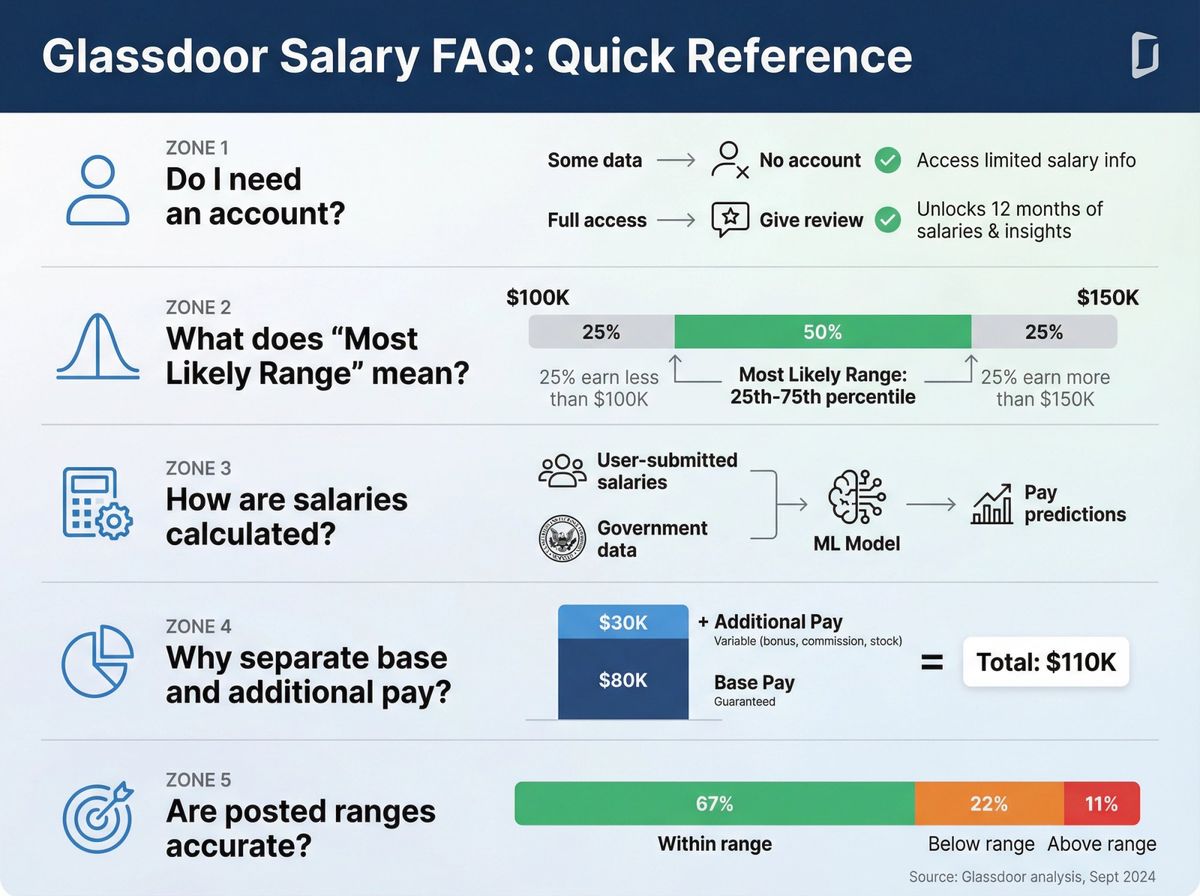
You can often view some salary information without creating an account, but Glassdoor's Give-to-Get model may prompt you to create an account and/or contribute content to unlock broader or unlimited access.
What does "Most Likely Range" mean on Glassdoor salary pages?
Glassdoor states that the "Most Likely Range" reflects values within the 25th and 75th percentile of pay data available for that role. It's not the absolute minimum and maximum, but rather where most actual offers fall.
How does Glassdoor calculate salaries?
On role pages, Glassdoor notes its salaries are powered by a proprietary machine learning model that uses salaries collected from users and "the latest government data" to make pay predictions.
Why does Glassdoor show base pay and additional pay separately?
Because total compensation often includes variable components like bonuses, commissions, profit sharing, and stock options. Glassdoor breaks it down so you can see how much is guaranteed (base pay) versus how much is variable (additional pay). This is critical for understanding income stability.
Are employer-posted salary ranges always accurate?
Not always. Glassdoor's pay range accuracy analysis (September 30, 2024) found that employer-provided ranges were accurate about 67% of the time, with 22% of actual salaries below the posted range and 11% above the posted range. Always validate posted ranges with user-reported data.
Quick recap
If you only remember one method from this guide, do this:
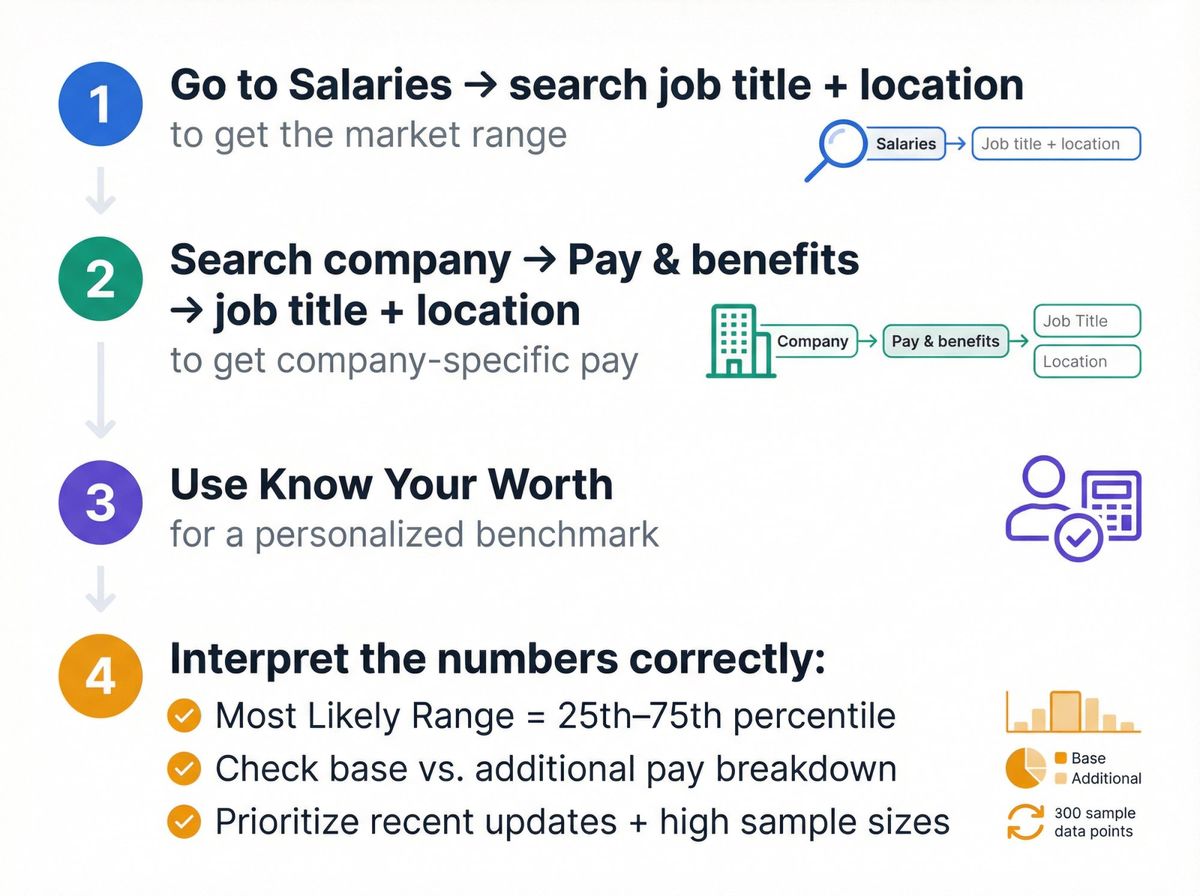
1. Go to Salaries → search job title + location to get the market range
2. Search company → Pay & benefits → job title + location to get company-specific pay
3. Use Know Your Worth for a personalized benchmark
4. Interpret the numbers correctly: Most Likely Range is the 25th–75th percentile, based on statistical wage analysis. Check base versus additional pay. Prioritize recently updated pages with high sample sizes.
Understanding salary expectations and how to negotiate are critical skills for career success.